QG Professional Services
- Microsoft & Cloud
- Cybersecurity
Conditional Access is the policy engine of Zero Trust in Microsoft 365: every sign-in evaluated against who is asking, from what device, from where, at what risk, before access is granted. It is also where we find the most dangerous misconfigurations in tenant assessments, precisely because a Conditional Access mistake fails silently: the tenant works, users sign in, and the gap only becomes visible when an attacker uses it.
Here is the baseline policy set we deploy, and the recurring mistakes we correct.
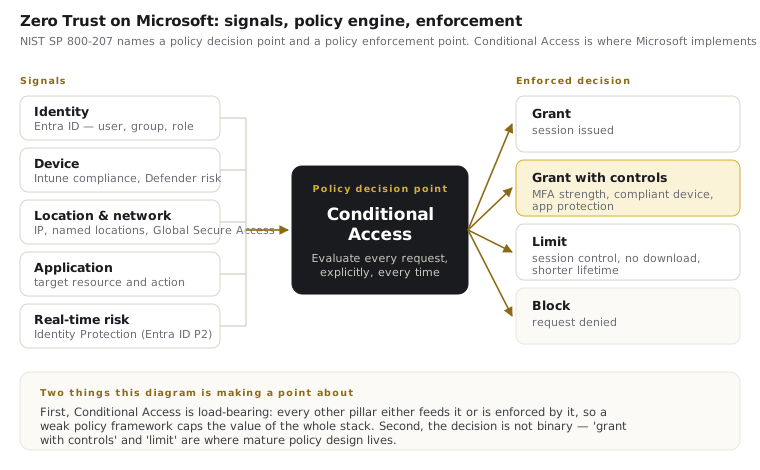
The baseline policy set
Deployed in report-only mode first, then enforced after impact review:
- Require MFA for all users. The foundation policy, targeting all users and all cloud apps, with only the break-glass accounts and defined service exceptions excluded. Per-user MFA settings should be retired at the same time: running both models creates the confusion exceptions hide in. Note also that Microsoft now enforces MFA for sign-ins to the Microsoft Entra admin center, Azure portal and Microsoft Intune admin center, with that enforcement extended to Azure CLI, Azure PowerShell and other management interfaces. Treat it as a floor imposed on you, not as your policy.
- Block legacy authentication. Legacy protocols (IMAP, POP, SMTP AUTH, older Office clients) do not perform MFA. A tenant with MFA "everywhere" and legacy auth allowed has MFA nowhere an attacker cares about: password spray simply walks around it.
- Require MFA for administrators: always, from anywhere. Admin roles get no trusted-location exemptions and no device-based bypass. Stronger still: use an authentication strength to require phishing-resistant methods for privileged roles rather than merely making them available, for reasons AiTM attacks make clear. Authentication strengths are what turn “passkeys are available” into “passkeys are the only thing that works here”.
- Require compliant or hybrid-joined devices for access to company data. This is the policy that makes your Intune investment enforceable: unmanaged devices get blocked or contained to web-only access without download rights.
- Block or tightly control access from countries you do not operate in. Geo-blocking is not a security boundary on its own (attackers rent local infrastructure), but it removes an enormous volume of commodity noise and makes the remaining signal reviewable.
- Protect security-info registration. Require a trusted context for registering MFA methods: otherwise an attacker with a stolen password simply enrols their own authenticator.
- Two break-glass accounts, excluded from everything, monitored for any use. Cloud-only, long random credentials, stored offline, alerted on sign-in. Every lockout story that ends badly is a tenant that skipped this.
The five misconfigurations we keep finding
1. Exclusions that swallowed the policy. A troubleshooting exclusion added "temporarily", a group excluded for a VIP who found MFA annoying, a service account group that quietly accumulated human members. Exclusions are where Conditional Access goes to die: every one needs an owner, a reason and a review date.
2. No device signal in any policy. MFA-only baselines were state of the art in 2019. Without a compliance requirement, a phished session token works as well from an attacker's machine as from the user's. Device compliance as a grant control is the single highest-value upgrade to a basic policy set.
3. Report-only policies that never graduated. We regularly find correct, well-designed policies that have sat in report-only mode for a year: deployed caution that became permanent exposure. Report-only is a phase with an end date, not a destination.
4. "All apps" policies that quietly exclude the ones that matter. Policies scoped to a hand-picked app list drift out of date as new services appear. Target all cloud apps and manage the genuine exceptions explicitly: the inverse model fails open.
5. Continuous Access Evaluation left out of the design. Conditional Access without CAE evaluates at sign-in and then trusts the token until it expires. With CAE, critical events (account disabled, password reset, elevated risk, network change) propagate to supporting services in near real time. If your incident runbook says “revoke sessions”, CAE is what makes that revocation take effect in minutes rather than at token expiry.
6. No policy for guests and external identities. B2B guests arrive with their home tenant's security posture, which you cannot see. Guests need their own policy set: MFA enforced at your boundary, restricted app access, and periodic access reviews so departed collaborators do not accumulate.
Design principles that keep it maintainable
Be deliberate about Microsoft-managed policies: Microsoft now rolls baseline Conditional Access policies into tenants automatically, in report-only mode, and they co-exist with yours. Review each one, decide explicitly whether to adopt, customise or exclude it, and record that decision — an unreviewed managed policy is an exclusion you did not knowingly make. Beyond that, name policies systematically (numbered, purpose-stated), so the console reads as a policy framework rather than an archaeology site. Prefer a small set of broad policies over dozens of narrow ones: every additional policy multiplies interaction complexity. Test with the What If tool before enforcement. And review the whole set quarterly against sign-in logs: Conditional Access is living configuration, and the tenants that treat it that way are the ones whose incidents stay small.
Practical steps
Export your current policies and check them against the baseline above: the gaps will be obvious. Audit every exclusion and delete the ones nobody can justify. Enable at least one device-signal policy this quarter. If your policy estate has grown organically over years, a structured review is faster than archaeology: we rebuild Conditional Access frameworks as part of most identity engagements, because everything else in Zero Trust depends on this layer being right.