QG Professional Services
- Cybersecurity
- Microsoft & Cloud
"We have MFA" has become the most dangerously reassuring sentence in security reviews. It was true protection in the password-spray era; against the current generation of adversary-in-the-middle (AiTM) phishing kits, the common forms of MFA (push approvals, SMS codes, one-time passwords) are speed bumps, not walls. We have investigated incidents where the user did everything the awareness training taught, approved a login that looked entirely legitimate, and handed the attacker a fully authenticated session.
Understanding why is the first step to fixing it, because the fix is not "more MFA": it is different MFA plus controls that make stolen sessions worthless.
How AiTM actually works
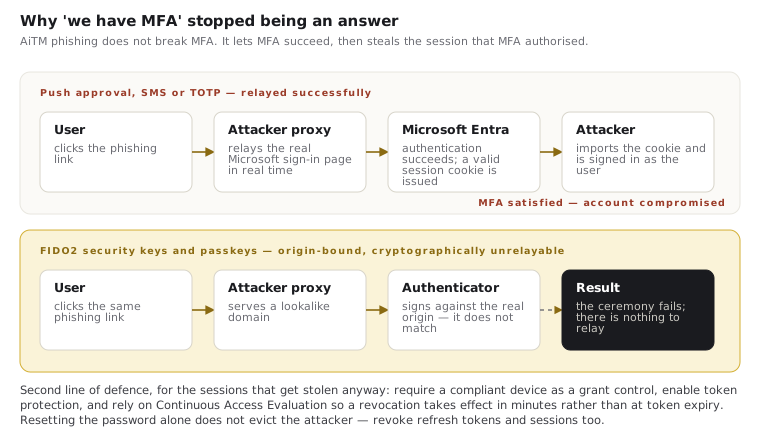
The attack is elegantly simple. The phishing link leads to a reverse proxy that sits between the victim and the real Microsoft sign-in page, and the victim sees the genuine login experience, brand and all, relayed in real time. The victim enters their password: the proxy passes it through. Microsoft challenges with MFA: the proxy relays that too, and the victim approves it on their phone, because from their perspective a normal sign-in is happening.
Here is the crucial part: the victim authenticates successfully, and the session cookie Microsoft issues lands on the attacker's proxy. The attacker imports that cookie into their own browser and is now signed in as the victim, MFA satisfied. No password cracking, no MFA bypass in the technical sense: the MFA worked perfectly and protected nothing, because the session it authorised was stolen. From there the playbook is familiar: mailbox rules for exfiltration, business email compromise, lateral phishing from a trusted internal account.
Phishing kits with these capabilities are sold as subscription services. This is commodity tooling now, not nation-state tradecraft.
Why some MFA resists and some doesn't
The vulnerable factors (push approval, SMS, TOTP codes) share a flaw: nothing binds the authentication to the site the user is actually visiting. The user proves their identity; the proxy harvests the result.
Phishing-resistant methods break the relay cryptographically. FIDO2 security keys and passkeys (including Windows Hello for Business) perform origin-bound authentication: the cryptographic exchange incorporates the domain the browser is really connected to. Authenticate through a proxy at a lookalike domain, and the signature simply doesn't validate: the phishing site cannot complete the ceremony, regardless of what the user believes or approves. This is not an incremental improvement over push MFA; it is a categorical one.
The control set that closes the gap
Deployed together through Entra ID, in this order of urgency:
- Phishing-resistant MFA for privileged and high-risk users first. Admins, executives, finance. Conditional Access authentication-strength policies let you require phishing-resistant methods for these populations rather than merely offering them. Broad passkey rollout follows.
- Require compliant devices for access. A stolen session replayed from an attacker's machine fails a Conditional Access device-compliance check: the single most effective mitigation for token theft after phishing resistance itself, because it devalues the stolen cookie.
- Token protection and risk-based response. Entra's token protection binds sign-in sessions to the device where feasible; Identity Protection's risk signals (anomalous token use, impossible travel, unfamiliar sign-in properties) feed Conditional Access policies that force re-authentication or block: the E5-tier capability that detects the replay in progress. Check current support boundaries before relying on token protection: coverage varies by client and resource, so treat it as a strong additional layer rather than a universal one.
- Continuous Access Evaluation, enabled and understood. CAE shortens the life of a stolen session from “until the token expires” to “until the next critical event propagates”. It is what makes revocation meaningful during an incident, and it is the difference between a containment step that works in minutes and one that works in an hour.
- Hygiene that shrinks the blast radius: number matching and context in Microsoft Authenticator (already the enforced default, but verify), shortened session lifetimes for unmanaged contexts, and revocation drills: when AiTM is suspected, resetting the password is not enough; revoke refresh tokens and sessions, or the attacker rides out the reset.
Recalibrate the awareness message too
Years of training taught users to check the padlock and the login page's appearance. Against AiTM both checks pass. The honest message now: the link's origin is everything, approval fatigue is an attack vector, and unexpected MFA prompts mean report, not approve. But design your controls assuming awareness will sometimes fail, because it will, and phishing-resistant authentication is precisely the control that doesn't care.
Practical steps
Count how many of your privileged accounts could sign in right now with push-approval MFA: that number is your AiTM exposure. Pilot passkeys with the admin population this quarter; enforce authentication strengths once piloted. Verify device compliance is a grant requirement, not an aspiration. QG deploys identity-first security on the Microsoft stack (Conditional Access, authentication strengths, Identity Protection) as the core of every engagement, because identity is where the modern attack begins.