QG Professional Services
- Microsoft & Cloud
- Cybersecurity
- Cost
Microsoft 365 licensing questions are security questions in disguise. The difference between Business Premium, E3, E5 and now E7 is not primarily about Office apps or mailbox sizes; it is about which identity, endpoint and data protections your organisation runs on. And because licensing is negotiated by procurement while security is owned by IT, the two conversations often never meet. We see the result in assessments: organisations paying for E5 running at Business Premium depth, and organisations on E3 convinced they are covered against threats their tier cannot see.
Two things changed in 2026 and both belong in this decision. Microsoft 365 E7 arrived on 1 May, and the July 2026 packaging update moved capability down the stack — most consequentially into E3. Anything written about these tiers before mid-2026 is now partly wrong.
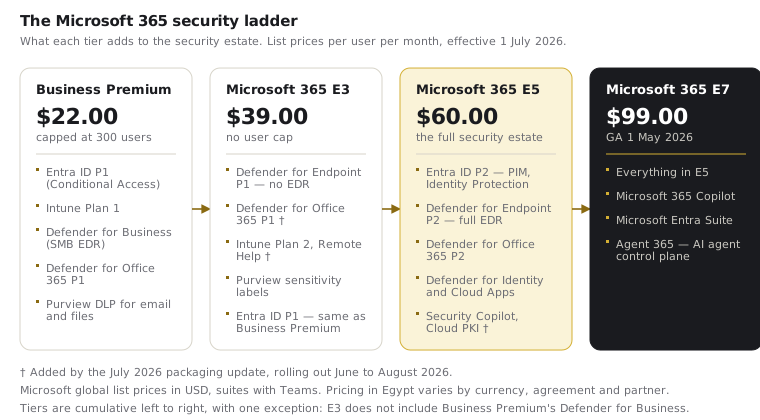
What each tier actually gives you
Business Premium ($22.00, capped at 300 users) is the SMB security bundle and, feature for price, the strongest value in the portfolio: Entra ID P1 for Conditional Access, Intune Plan 1, Defender for Business (genuinely capable SMB-grade EDR), Defender for Office 365 P1 with Safe Links and Safe Attachments, and Purview DLP for email and files. What it lacks is the P2 tier: no PIM, no risk-based Identity Protection, no advanced hunting, no CASB.
Microsoft 365 E3 ($39.00) removes the user cap and adds enterprise information protection and full Windows enterprise features. Its security stack is thinner than most buyers assume, but it is important to be precise about how it is thin, because this is where most published comparisons are wrong:
- E3 does include Microsoft Defender for Endpoint Plan 1 — and has since January 2022. P1 provides next-generation antimalware, attack surface reduction rules, device control, endpoint firewall, network protection and manual response actions.
- E3 does not include Defender for Endpoint Plan 2. That is the real gap: no endpoint detection and response, no advanced hunting, no automated investigation and remediation.
- E3 gained Defender for Office 365 Plan 1 in the July 2026 packaging update. Before that rollout, E3 shipped with Exchange Online Protection only — no Safe Links, no Safe Attachments, no impersonation protection. If your tenant has not yet received the update, do not assume time-of-click protection is running.
- E3 also gained Intune Plan 2, Remote Help and Advanced Analytics in the same update.
- E3 carries Entra ID P1, the same identity tier as Business Premium. No PIM, no Identity Protection.
The honest framing: E3 is an enterprise productivity baseline with preventative endpoint controls, not an enterprise detection-and-response baseline.
Microsoft 365 E5 ($60.00) is where the full security estate lives: Entra ID P2 (PIM, Identity Protection, access reviews), Defender for Endpoint P2 (full EDR, advanced hunting, automated investigation), Defender for Office 365 P2 (attack simulation, automated investigation and response), Defender for Identity, Defender for Cloud Apps, Purview advanced DLP and Insider Risk, and the Microsoft Sentinel data grant of 5 MB per user per day. The July 2026 update adds Microsoft Security Copilot, Intune Endpoint Privilege Management, Microsoft Cloud PKI and Intune Enterprise Application Management.
Microsoft 365 E7 ($99.00) is E5 plus Microsoft 365 Copilot, the Microsoft Entra Suite and Agent 365 — the control plane for AI agents. It adds no new human-facing security capability over E5; what it adds is governance for non-human identities, plus Copilot. We cover that decision in our E7 guide.
The gaps that decide most incidents
When we investigate incidents or assess tenants, three capability differences explain most of the variation in outcome:
- Standing privilege (PIM, E5 and above). Permanent Global Administrator access versus just-in-time elevation is the difference between an admin-credential compromise being a catastrophe or a contained event. This is the single largest security difference between E3 and E5.
- Detection and response depth on the endpoint. E3's Defender for Endpoint P1 will prevent a great deal — if ASR rules are enforced, and in most tenants they are not. What P1 cannot do is detect, hunt and remediate an intrusion that gets past prevention. That is Plan 2, and it is what ransomware defence depends on once an attacker is already executing.
- Risk-based Conditional Access (E5 and above). Identity Protection's real-time sign-in and user risk signals let policies respond to token theft and AiTM-style session hijacking. A P1 tenant cannot see those events at all.
The mixed-licensing strategy nobody sells you
The binary "E3 or E5?" question has a better answer for most organisations: mixed licensing. Licences are assigned per user, and your users do not carry equal risk. A defensible pattern we implement regularly: E5 (or the E5 Security add-on) for administrators, executives, finance and other high-value targets; E3 or Business Premium for the general population; tenant-wide fundamentals enforced for everyone; and, where Copilot and agent governance genuinely apply, a small E7 population on top.
The Microsoft 365 E5 Security add-on on top of E3 deserves particular attention. It delivers the Defender and Entra P2 stack without full E5, and is frequently the most cost-effective route to enterprise-grade detection and response.
Two cautions. First, some protections behave tenant-wide, and licensing them for a subset creates compliance and coverage ambiguity: design the split deliberately, not opportunistically. Second, a mixed estate needs governance discipline — a written rule for who gets which tier and why, reviewed as roles change — or it decays into an entitlement history nobody can justify at renewal.
How to decide
| Situation | Recommendation |
|---|---|
| Under 300 users | Business Premium, fully deployed. It beats a half-configured E3 estate on real outcomes. |
| Over 300 users, cost-constrained | E3 plus the E5 Security add-on — for everyone if affordable, at minimum for privileged and high-risk users. |
| Regulated, targeted, or consolidating tooling | Full E5. The economics improve sharply when it displaces third-party EDR, CASB and SIEM spend. |
| Funded Copilot rollout, or AI agents in production | E7 for that population only, on an E5 or E3 base for everyone else. |
| Frontline-heavy workforce | Model F1 and F3 separately — they rose 33% and 25% in July 2026 and carry a different security profile entirely. |
Practical steps
Inventory what you currently pay for against what is actually deployed: in our assessments the gap is usually worth 30–50 Secure Score points of licensed-but-unconfigured capability, and full deployment is the actual challenge, not licence tier. Two checks worth doing this week regardless of tier: confirm whether ASR rules are enforced (they ship in E3 and are usually off), and confirm whether the July 2026 packaging rollout has reached your tenant. Then map your user population by risk before renewing anything — the renewal conversation is the one moment leverage favours you. QG runs licence-aligned security implementations at every tier, with the licence decision built from your risk profile rather than the reseller's quota.