QG Professional Services
- Microsoft & Cloud
"Should we move from SCCM to Intune?" is one of the most common endpoint-management questions we field, and it is usually framed as a versus decision when it should be framed as a sequencing decision. Configuration Manager (SCCM, now part of Microsoft Configuration Manager) and Intune are not simply competitors: Microsoft designed a bridge between them, co-management, precisely so organisations do not have to choose overnight. The real questions are which workloads to move, in what order, and where the honest end state is.
Here is the decision, without the tribalism.
What each tool is actually good at
Configuration Manager (SCCM) is the mature, on-premises-rooted powerhouse: deep OS deployment and imaging, granular software distribution, comprehensive patching including third-party and complex application packaging, and rich reporting, with the deep control of Windows internals that regulated and complex environments have relied on for years. Its costs are its architecture: on-premises infrastructure, VPN or network line-of-sight to manage devices, and weaker handling of the modern reality of devices that never touch the corporate network.
Intune is cloud-native endpoint management: manage any device anywhere over the internet, no on-premises infrastructure, native integration with Conditional Access and device-compliance gating, Windows Autopilot for zero-touch provisioning, and strong mobile (iOS/Android) management SCCM never did well. Its historical gaps (deep application packaging, complex patch orchestration) have narrowed considerably but still matter for the most complex estates.
The honest summary: SCCM for deep control of a networked Windows estate; Intune for managing a distributed, any-device, remote-first workforce. Most organisations in 2026 have both realities.
Co-management: the bridge, not a compromise
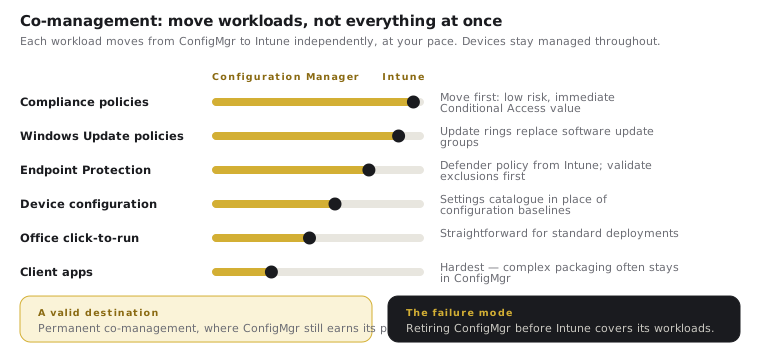
Co-management lets a single device be managed by both SCCM and Intune simultaneously, with workloads (compliance policies, Windows Update, endpoint protection, device configuration, Office click-to-run, client apps) shifted from SCCM to Intune one at a time, at your pace. This is the mechanism that makes "Intune vs SCCM" a false binary: you enable co-management, then move workloads to Intune as you gain confidence, keeping SCCM for what it still does best. Devices stay managed throughout; nothing is a cliff-edge cutover.
The strategic use of co-management is as a migration vehicle: start with the low-risk workloads (compliance, Windows Update), prove the cloud model, then move the harder ones as capability and confidence allow.
How to decide your end state
- Fully cloud-native (Intune only), Autopilot provisioning: the right target for most organisations without deep legacy-application or specialised-imaging dependencies, especially those that are cloud-first on identity and security already. A remote-first workforce makes this compelling: managing home-based devices over VPN back to SCCM is friction the cloud model removes.
- Co-management, indefinitely: legitimate for organisations with genuine ongoing SCCM dependencies (complex packaging, specialised OS deployment, regulated configurations) that Intune does not yet fully replace. Co-management is a valid destination, not only a waypoint.
- The forcing functions toward cloud-native: licensing already paid for (Intune sits in Business Premium, E3 and E5), the remote-work reality, and Windows Autopilot's provisioning experience, which materially reduces IT deployment effort.
One of those forcing functions strengthened in 2026. The July 2026 packaging update adds Intune Plan 2, Remote Help and Advanced Analytics to Microsoft 365 E3 and EMS E3, and adds Endpoint Privilege Management and Enterprise Application Management to E5. If your co-management programme stalled on a capability gap, or on the cost of the Intune Suite add-on, that assessment is worth re-running: several of the gaps that justified staying on Configuration Manager have closed at no additional licence cost.
The migration sequence that works
- Enable co-management with SCCM and Intune connected via Entra.
- Move the low-risk workloads first (compliance policies, then Windows Update for Business) and validate against real users.
- Deploy Autopilot for new devices so the fleet becomes cloud-native by natural refresh rather than a forced re-image of everything.
- Migrate remaining workloads (configuration, endpoint protection, apps) as Intune proves out for your specific packaging and policy needs.
- Retire SCCM only when its remaining workloads are genuinely covered, not on principle, and not before.
The failure mode is the reverse of migration hesitancy: ripping out SCCM before Intune demonstrably covers the complex packaging or imaging an estate depends on, then discovering the gap in production.
Practical steps
Inventory your SCCM workloads and rank them by how cleanly Intune covers each: that list is your migration order. Enable co-management and move the easy workloads first; let Autopilot make new devices cloud-native by default. Decide your end state honestly from your application and imaging dependencies, not from a preference for "modern." QG delivers endpoint and Intune modernisation (co-management enablement, Autopilot, compliance policies and staged SCCM migration) as part of the Modern Workplace practice.