QG Professional Services
- Microsoft & Cloud
- Cost
- Cybersecurity
On 4 December 2025 Microsoft announced a global price and packaging update for its commercial Microsoft 365 suites and standalone components. The pricing took effect on 1 July 2026; the packaging changes began rolling out in June 2026 and complete by 1 August 2026. Standalone Teams and Copilot SKUs are outside the update.
Most commentary has covered the price rises. Less attention has gone to the half of the announcement that matters more operationally: Microsoft added meaningful security and management capability to E3 and E5, which means a number of organisations are about to acquire licensed features they will never switch on. That is the expensive part, and it is avoidable.
The price changes
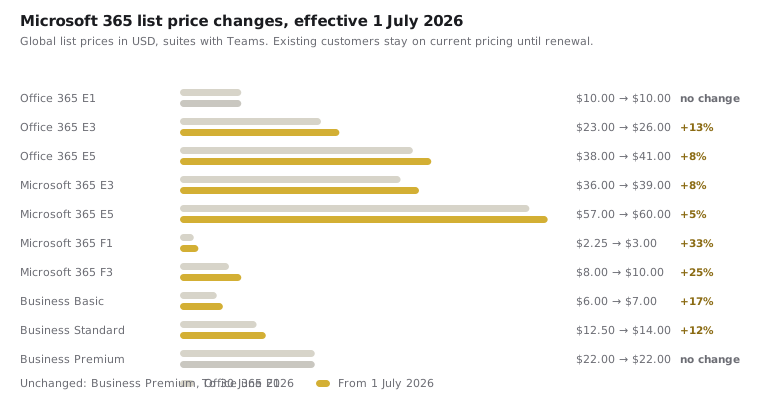
Increases range from nil to 33% depending on the SKU. The headline figures, per user per month in USD for suites with Teams:
| SKU | Was | From 1 July 2026 | Change |
|---|---|---|---|
| Office 365 E1 | $10.00 | $10.00 | — |
| Office 365 E3 | $23.00 | $26.00 | +13% |
| Office 365 E5 | $38.00 | $41.00 | +8% |
| Microsoft 365 E3 | $36.00 | $39.00 | +8% |
| Microsoft 365 E5 | $57.00 | $60.00 | +5% |
| Microsoft 365 F1 | $2.25 | $3.00 | +33% |
| Microsoft 365 F3 | $8.00 | $10.00 | +25% |
| Business Basic | $6.00 | $7.00 | +16% |
| Business Standard | $12.50 | $14.00 | +12% |
| Business Premium | $22.00 | $22.00 | — |
Three patterns are worth reading deliberately.
Frontline suites rose hardest in percentage terms. F1 at +33% and F3 at +25% land on exactly the organisations that buy them in volume: manufacturing, logistics, retail and hospitality, where a headcount of several thousand frontline workers turns a $0.75 monthly increase into a material budget line. Egyptian industrial employers with large deskless populations should model this specifically.
Business Premium did not move. It was already the strongest value in the portfolio for organisations under 300 users, and holding it flat while Business Standard rose 12% widens that gap further. For an SMB weighing Business Standard plus bolt-ons against Business Premium, the security-adjusted maths now favours Business Premium more clearly than before.
Suites without Teams rose faster in percentage terms than their with-Teams equivalents, narrowing the discount that separating Teams originally bought. If you moved to a no-Teams SKU purely for cost reasons, re-run that comparison.
Standalone components rose too, several sharply: Entra ID P1 +16% to $7.00, EMS E3 +13% to $12.00, Windows Enterprise per device +31%. Organisations that assembled a security stack from standalone add-ons rather than a suite should re-price the bundle, because the arithmetic that justified the add-on route may have inverted.
Nonprofit pricing moves in line with commercial, retaining a 60–75% discount. Government SKUs also move in line, with the notable difference that increases above 10% are phased over multiple years under US federal regulations.
The packaging changes — the part most organisations will miss
This is where the announcement gets operationally interesting. Microsoft is adding capability to existing suites at no additional charge, rolling out from June 2026 and complete by 1 August 2026, with 30 days' notice in your tenant's Message Center.
| Suite | What arrives |
|---|---|
| Office 365 E1 | URL time-of-click protection, Copilot Chat enhancements and analytics |
| Office 365 E3 | Defender for Office 365 Plan 1, Copilot Chat enhancements and analytics |
| Microsoft 365 E3 | Defender for Office 365 Plan 1, Intune Remote Help, Intune Advanced Analytics, Intune Plan 2 |
| Microsoft 365 E5 | Everything in E3, plus Microsoft Security Copilot, Intune Endpoint Privilege Management, Microsoft Cloud PKI, Intune Enterprise Application Management |
| Business Basic / Standard | +50 GB mailbox, URL time-of-click protection |
| Business Premium | +50 GB mailbox, Copilot Chat enhancements |
| EMS E3 | Intune Remote Help, Intune Advanced Analytics, Intune Plan 2 |
| Windows E3 | Quick Machine Recovery for commercial, post-quantum security APIs |
Four of these deserve your attention this quarter.
Defender for Office 365 Plan 1 arriving in E3 closes a real gap. Until this update, Microsoft 365 E3 shipped with Exchange Online Protection but not Defender for Office 365 — meaning no Safe Links, no Safe Attachments, no impersonation protection. E3 tenants have been running without time-of-click URL protection while assuming they had it. That gap now closes automatically, and it is directly relevant to business email compromise defence, where impersonation protection is one of the controls that actually works. Configure it: it does not enable itself in any useful way beyond defaults.
Intune Plan 2 in E3 and EMS E3 brings the advanced endpoint management tier — including the capabilities that make Intune viable as a ConfigMgr replacement for a wider set of estates. If your co-management migration stalled on an Intune capability gap, this is worth re-testing rather than assuming the earlier assessment still holds.
Endpoint Privilege Management in E5 is the one with the largest security upside and the least attention. Removing standing local administrator rights while allowing controlled elevation is among the highest-value endpoint hardening moves available, and it directly weakens the escalation stage of the ransomware chain. It has historically sat behind the Intune Suite add-on. E5 customers should treat this as a project, not a feature notification.
Security Copilot in E5 changes the calculus for lean security teams. Its practical value depends heavily on the quality of the signal underneath it, which is a reason to get Defender and Sentinel deployment right first rather than expecting an assistant to compensate for thin telemetry.
Where E7 fits
Announced separately and generally available from 1 May 2026, Microsoft 365 E7 sits above E5 at $99 per user per month, bundling E5 with Microsoft 365 Copilot, the Entra Suite and Agent 365. It is not part of this pricing update, but it belongs in the same renewal conversation, because the E5 baseline it is measured against has just moved.
What to actually do
Before renewal:
- Model the increase across your real user mix, not the headline percentage. An estate weighted to F1 and F3 sees a very different number from one weighted to E5. Frontline-heavy Egyptian employers should run this first.
- Existing agreements hold current pricing until renewal. That is leverage with a deadline attached. Know your renewal date, and start the analysis at least a quarter out.
- Re-price standalone add-ons against suites. Several standalone components rose faster than the suites containing them.
Regardless of renewal:
- Watch Message Center for the packaging rollout notice and treat it as a work item, not an announcement. Newly included capability that nobody configures is pure cost.
- Reconcile entitlement against deployment. In our assessments the gap between licensed and configured capability is typically worth 30–50 Secure Score points. A price rise on capability you are not using is the worst possible outcome, and the cheapest one to fix.
- Re-baseline after the rollout completes. Your Secure Score denominator changes when new capability lands in your tenant, so a score that appears to drop in August may reflect new available points rather than any regression — a distinction worth understanding before someone reports it as a decline.
Practical steps
Pull your current licence inventory and your renewal date this week. Model the July 2026 pricing against your actual user mix by tier. Then list what the packaging update is about to hand you — Defender for Office 365 P1, Intune Plan 2, Endpoint Privilege Management — and schedule the configuration work, because none of it protects anyone at default settings. QG runs licence-aligned security assessments and implementations across the Microsoft 365 range, and we scope renewals around what you will actually deploy rather than what fits the quote.
Pricing and packaging figures are taken from Microsoft's Microsoft 365 Pricing and Packaging Updates page, which remains the authoritative source and is subject to change. List prices are global, in USD, for suites with Teams; pricing in Egypt varies by currency, agreement type and partner.