QG Professional Services
- Cybersecurity
- Microsoft & Cloud
Ransomware is a business, and like any business it optimises for margin: it targets the cheap, predictable weaknesses that most organisations leave open. The uncomfortable corollary is that the defences which actually break ransomware are, for the majority of Microsoft 365 organisations, features they already license and have not configured. We see it in assessment after assessment: E3 and E5 tenants paying for a ransomware-defence estate that sits at defaults while the organisation prices third-party tools to fill gaps the stack already covers.
Ransomware is not a single event to block; it is a chain of stages, and you win by breaking any link. Here is the Microsoft-native control set mapped to the chain.
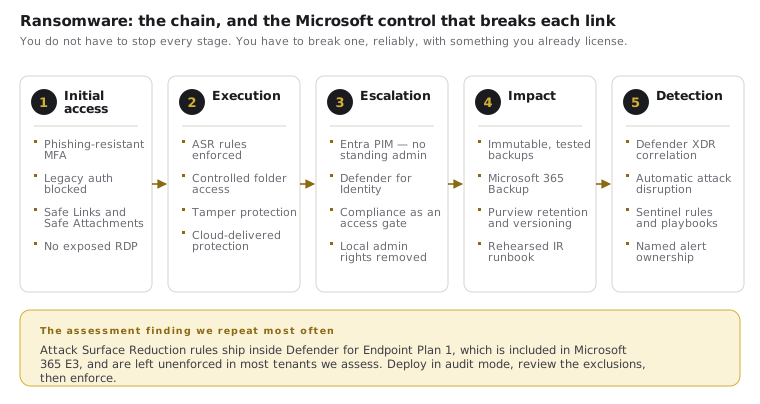
Stage 1: Initial access (close the front doors)
Ransomware gets in predominantly through phished credentials, exposed remote access and malicious email. The controls:
- Identity hardening: phishing-resistant MFA and Conditional Access for the accounts attackers target first, and legacy authentication blocked so MFA cannot be walked around.
- Defender for Office 365: Safe Links and Safe Attachments detonating malicious payloads before delivery, plus anti-phishing policies.
- No exposed RDP or unmanaged remote access: attack-surface reduction begins with not publishing the doors ransomware walks through.
Stage 2: Execution and persistence (Defender for Endpoint, actually configured)
Once code runs on an endpoint, EDR is the control that matters, and its highest-value features are frequently off:
- Attack Surface Reduction (ASR) rules: block the specific behaviours ransomware relies on — Office applications spawning executables, script-launched payloads, credential theft from LSASS, execution from email and USB. Worth being precise about the licensing, because it is the reason so many organisations wrongly believe this is out of reach: ASR rules ship in Defender for Endpoint Plan 1, which is included in Microsoft 365 E3 as well as E5, and in Defender for Business at the Business Premium tier. They are high-impact, already paid for, and disabled in most tenants we assess. Deploy in audit mode, review the exclusions that surface, then enforce.
- Controlled folder access: blocks unauthorised processes from modifying protected folders, directly countering the encryption step.
- Tamper protection: stop attackers disabling your defences. Available across the tiers, and frequently left off.
- Automated investigation and remediation, and automatic attack disruption: these are Plan 2 capabilities, so E5 or the E5 Security add-on. Attack disruption is the one worth understanding: when Defender XDR has high-confidence signal that a ransomware attack is under way, it will contain the affected device or suspend the compromised account automatically, in the middle of the attack, faster than a human SOC can react at 3 a.m. If you hold E5 and have not confirmed this is enabled, that is a short and high-value task.
Stage 3: Privilege escalation and lateral movement (make spread expensive)
Ransomware's damage scales with how far it spreads. The single most effective architectural control is limiting standing privilege:
- Entra PIM: just-in-time admin elevation so there are few standing privileged accounts to steal. The E5 identity tier earns its cost here.
- Defender for Identity: sensors on domain controllers detecting the reconnaissance and lateral-movement techniques (pass-the-hash, suspicious replication, Kerberos abuse) that precede mass encryption.
- Device compliance as an access gate: a compromised device flagged by Defender loses access automatically, containing spread through Conditional Access.
Stage 4: Impact (survive the encryption)
Assume-breach means planning for the attack that succeeds:
- Immutable, tested backups: the control that decides whether encryption is a catastrophe or an inconvenience. Backups attackers cannot reach or delete, and — the part organisations skip — restoration actually rehearsed. An untested backup is a hope, not a control.
- Purview retention and versioning across SharePoint and OneDrive, so cloud-resident data has recovery points.
- Microsoft 365 Backup is now a first-party option for fast, large-scale restore of Exchange, SharePoint and OneDrive data within the Microsoft cloud. It is priced separately from your suite and it is not a substitute for a wider backup strategy covering endpoints and non-Microsoft workloads — but for organisations whose recovery plan for M365 data currently consists of the recycle bin and hope, it closes a real gap.
- A rehearsed incident response plan: isolation, revocation (reset passwords and revoke tokens and sessions), communication, recovery sequence, decided before the incident, not during it.
Stage 5: See it happening (correlation and response)
The controls above generate signals; something must connect them. Microsoft Sentinel correlates identity, endpoint, email and cloud telemetry into detections a human can act on, with automated playbooks for the first containment moves. Correlation is what turns six disconnected alerts into one recognised attack in progress.
The consolidation argument, made plainly
Organisations routinely run (and pay for) third-party EDR, email security, CASB and SIEM alongside an E5 licence that includes all four. The security case for consolidation is not only cost: a single correlated signal set across identity, endpoint, email and data catches what stitched-together point tools miss in the gaps between them. Before buying another ransomware product, the honest first step is a full accounting of what the stack you own already does once configured.
Practical steps
Check whether ASR rules are enforced in your tenant: if you are unsure, they are not, and that is the highest-value afternoon of ransomware defence available to you. Confirm your backups are immutable and that a restore has actually been tested this year. Count your standing Global Admins. QG deploys Microsoft-native ransomware defence across the full kill chain (identity, endpoint, lateral-movement and recovery), configuring the protection most organisations already own but have never switched on.