QG Professional Services
- Microsoft & Cloud
- Cost
- AI Security
- Cybersecurity
Microsoft 365 E7 is the first new enterprise suite Microsoft has introduced since E5 launched in 2015. Announced on 9 March 2026 and generally available from 1 May 2026, it sits above E5 at $99 per user per month and carries a name Microsoft chose deliberately: the Frontier Suite. The framing is that the enterprise now employs two kinds of worker, human and agentic, and that both need licensing, identity and governance.
That framing is marketing. The licensing question underneath it is concrete and answerable, and most organisations we advise are asking it badly: they are comparing $60 to $99 rather than comparing E7 to what they would otherwise buy separately. Here is the analysis that actually decides it.
What is actually in the box
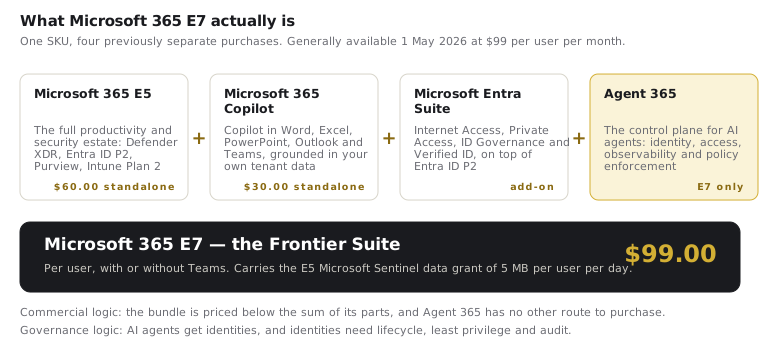
E7 is a bundle of four things, three of which you could already buy:
- Microsoft 365 E5 — the entire productivity and security estate: Defender XDR across endpoint, identity, email and cloud apps; Entra ID P2 with PIM and Identity Protection; Purview at depth; Intune Plan 2. This is the same E5 discussed in our security-first licensing guide.
- Microsoft 365 Copilot — Copilot in Word, Excel, PowerPoint, Outlook and Teams, grounded in your tenant's own data through Microsoft Graph.
- Microsoft Entra Suite — Entra Internet Access, Entra Private Access, ID Governance and Verified ID, layered on top of the Entra ID P2 already in E5.
- Agent 365 — the component with no other route to purchase, and the one that explains why the suite exists.
E7 is available with or without Teams, in line with the rest of the enterprise range, and it carries the E5 Microsoft Sentinel data grant of 5 MB per user per day.
Agent 365 is the actual product
Everything else in E7 is a repackaging exercise. Agent 365 is new, and it is worth understanding on its own terms, because it answers a governance problem most organisations have not yet formalised.
As soon as an organisation deploys AI agents that act on its behalf — reading mailboxes, querying SharePoint, calling line-of-business APIs, triggering workflows — those agents need the same things a human employee needs: an identity, an access grant scoped to a purpose, a joiner-mover-leaver lifecycle, an audit trail, and a policy that governs what they may and may not do. Agent 365 provides that control plane: agents are registered in Entra, their access is visible and governable, and existing conditional access, compliance and monitoring policies extend to them.
The security argument for this is straightforward and, in our view, correct. An ungoverned agent is a non-human identity with standing access, no owner and no review cycle — which is a fair description of the service accounts that have caused a large share of the lateral-movement incidents of the last decade. The organisations that fared worst there were the ones that let non-human identities accumulate faster than governance could track them. Agentic AI reproduces that pattern at much higher speed.
This is also precisely the territory ISO 42001 governs. An AI management system requires an inventory of AI systems, named accountability per system, lifecycle control and human oversight; Agent 365 is a technical control that helps evidence several of those requirements inside a Microsoft estate. It does not deliver the management system — a tool never does — but it materially reduces the effort of operating one.
Where E7 sits in the ladder
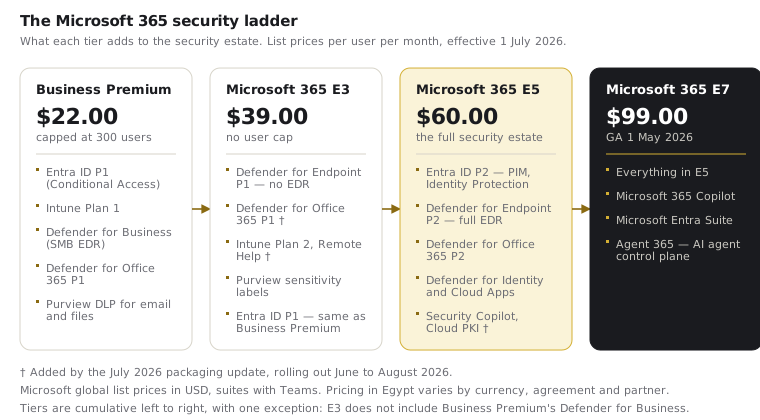
The arithmetic that matters is not $60 versus $99. It is $99 versus what the same capabilities cost bought separately:
| Component | Standalone list price | In E7 |
|---|---|---|
| Microsoft 365 E5 | $60.00 | included |
| Microsoft 365 Copilot | $30.00 | included |
| Microsoft Entra Suite | add-on | included |
| Agent 365 | not sold separately | included |
| Total | $90.00 plus two add-ons | $99.00 |
E5 plus Copilot alone is $90 before the Entra Suite is priced in. On that basis E7 is competitively assembled — but only for an organisation that was genuinely going to buy Copilot for those users. That condition does most of the work in the decision, and it is where the analysis usually goes wrong.
Who should buy it, and who should not
A defensible case for E7:
- You have already committed to Microsoft 365 Copilot for a defined population, and those users are already on E5. Here E7 is close to a free upgrade in exchange for a modest increment, and Agent 365 arrives as genuine additional value.
- You are actively deploying AI agents — Copilot Studio agents, autonomous agents in business processes — and have no governance answer for them. The control-plane problem is real and will not stay ignorable.
- You are already buying, or about to buy, the Entra Suite for Internet Access or Private Access as part of a Zero Trust or VPN-replacement programme. That add-on cost folds into the bundle.
A weak case for E7:
- Copilot adoption is a pilot, an experiment, or a board aspiration rather than a funded rollout. Paying $39 per user per month above E5 to acquire Copilot licences nobody has been trained to use is the most expensive way to run a pilot. Buy Copilot for the pilot group and leave the rest on E5.
- Your E5 estate is under-deployed. This is the more common situation by a wide margin. An organisation whose Secure Score sits in the 25–40% band, whose Conditional Access has unaudited exclusions, and whose ASR rules have never been enforced does not have a licensing gap. Buying a higher tier to fix an implementation problem is how organisations end up paying E7 prices for Business Premium outcomes.
- You have no AI agents in production and no near-term plan for any. Agent 365 is the component you are paying the premium for; without agents to govern, the premium buys Copilot at a bundle discount and nothing else.
The mixed-licensing point still holds
E7 does not change the argument we make about every other tier: licences are assigned per user, and users do not carry equal risk or equal value. The pattern that survives scrutiny is usually a small E7 population — the people building and running agentic workflows, plus the knowledge workers where Copilot has demonstrable value — sitting on top of an E5 or E3 base for everyone else.
Two cautions apply, as they do to any mixed estate. Some capabilities behave tenant-wide, so licensing them for a subset creates coverage ambiguity that has to be designed deliberately rather than discovered later. And a mixed estate needs a written rule for who gets which tier and why, reviewed as roles change, or it degrades into an entitlement history nobody can explain at renewal.
What to do before the renewal conversation
Three pieces of work, in this order, and none of them requires a purchase decision:
- Inventory the AI agents already operating in your tenant. Copilot Studio agents, Power Platform flows with AI actions, third-party agents with Graph permissions. In our experience organisations consistently find more than governance knew about — the same pattern as the ISO 42001 AI inventory. If that inventory is empty and likely to stay empty for a year, E7 is premature.
- Establish what your E5 estate is actually delivering. If material E5 capability is unconfigured, the return on fixing that exceeds the return on any upgrade, and it is a fraction of the cost. Our Microsoft 365 hardening checklist is the fastest way to test this honestly.
- Model the mixed split against real Copilot demand, not aspirational demand. The number of users with a funded, trained, measured Copilot use case is the number of E7 licences worth discussing.
Then have the renewal conversation, keeping in mind that it lands alongside the July 2026 price and packaging changes — which move the E5 baseline you are comparing against.
Practical steps
Run the agent inventory this month: it costs little and it converts an abstract licensing debate into a concrete one. Assess what your current tier already gives you before paying for the next one. Then size E7 to the population that genuinely needs Copilot and agent governance, and hold the line on the rest. QG runs licence-aligned Microsoft security implementations and tenant assessments across Business Premium to E7, with the licence decision built from your risk and adoption profile rather than the reseller's quota.