QG Professional Services
- Microsoft & Cloud
- Cybersecurity
The most consistent finding across the Microsoft 365 tenants we assess is not a missing product — it is unused capability. Organisations buy Business Premium or E5, deploy email and Teams, and leave the security features that justify the licence cost sitting at defaults. The result shows in the numbers: tenants typically arrive at their first assessment with a Microsoft Secure Score between 25 and 40 per cent. The controls below are how that number — and the real-world exposure behind it — changes.
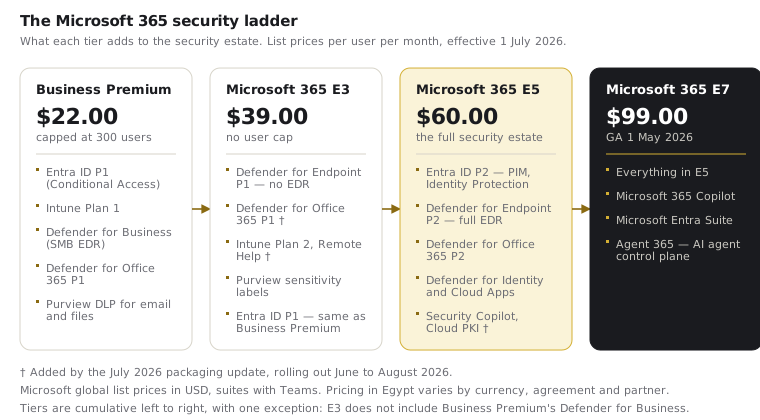
This checklist is organised by licence tier, because the right hardening plan starts from what you already own. Two 2026 changes affect what that is: the July 2026 packaging update pushed capability down into E3 and E5, and Microsoft 365 E7 arrived above E5. Re-check your entitlements before assuming last year's gap analysis still holds.
Every tenant, every licence: the non-negotiables
- Enforce MFA for all users — via Conditional Access, not per-user settings. Identity compromise begins almost every modern attack. Microsoft's security defaults are the floor; Conditional Access policies are the standard. Require MFA for all users, with break-glass accounts excluded and documented.
- Block legacy authentication. Protocols like IMAP, POP and SMTP AUTH bypass MFA entirely. Every tenant we assess with password-spray incidents in its logs has legacy auth enabled. Block it tenant-wide and whitelist the genuine exceptions only after they are inventoried.
- Protect and reduce privileged roles. Global Administrator count in single digits, all admin accounts cloud-only and MFA-enforced, separate accounts for admin work. Excess Global Admins are among the most common critical findings in our assessments.
- Turn on unified audit logging and review it. It is the forensic record of your tenant; incidents are unreconstructable without it.
- Configure anti-phishing, SPF, DKIM and DMARC. Outbound spoofing of your own domain is your brand's problem as much as inbound phishing is your users'.
Business Premium (≤300 users): use what the SMB tier already includes
Business Premium is remarkable value on paper — Entra ID P1, Intune, Defender for Business, Defender for Office 365 P1 — and chronically under-deployed in practice:
- Conditional Access (included via Entra P1): baseline policies for MFA, device compliance, and blocking risky sign-in patterns.
- Intune device enrolment and compliance policies: unmanaged devices accessing company data is the SMB norm we most often correct. Require enrolment and set compliance as a Conditional Access gate.
- Defender for Business: endpoint detection and response for the SMB tier — deploy it to every endpoint, enable attack surface reduction rules, and turn on automated investigation.
- Safe Links and Safe Attachments (Defender for Office 365 P1): time-of-click URL protection and attachment detonation. Included; frequently never enabled.
Microsoft 365 E3: the enterprise baseline
E3 adds scale and information protection but — critically — not the advanced Defender plans. Priorities:
- Everything above, plus Purview sensitivity labels and DLP for your crown-jewel data locations.
- Intune at full depth: Windows Autopilot provisioning, update rings, application protection policies for mobile.
- Defender for Endpoint Plan 1, which E3 has included since 2022 and which most E3 tenants have never configured. Enforce attack surface reduction rules (audit mode first), then turn on network protection and device control. This is the highest-value unclaimed capability in a typical E3 estate.
- Defender for Office 365 P1, which arrives in E3 with the July 2026 packaging update: enable Safe Links, Safe Attachments and impersonation protection once the rollout reaches your tenant. Before that rollout E3 carried Exchange Online Protection only, so verify which side of the line you are on rather than assuming.
- Know the gap you are accepting: E3 includes no Defender for Endpoint P2 (so no EDR, no advanced hunting, no automated investigation), no Defender for Identity, and no Entra ID P2 (so no PIM, no risk-based Identity Protection). Decide consciously whether to accept that gap, add-license the pieces, or step to E5. Our licence comparison guide covers the decision in detail.
Microsoft 365 E5: deploy the stack you are paying a premium for
An E5 tenant running at E3-level configuration is the most expensive misconfiguration in the Microsoft ecosystem. The E5 security estate, deployed:
- Defender XDR across all four domains — Endpoint P2 (full EDR and threat hunting), Office 365 P2 (attack simulation), Identity (domain-controller sensor detecting lateral movement), and Cloud Apps (SaaS discovery and session control).
- Entra ID P2: Privileged Identity Management for just-in-time admin access, risk-based Conditional Access via Identity Protection, and access reviews.
- Purview at depth: auto-labelling, advanced DLP including Teams, Insider Risk Management.
- Automatic attack disruption, which contains a device or suspends an account mid-attack on high-confidence signal. Confirm it is enabled: it is among the highest-value E5 features and among the least deliberately switched on.
- The July 2026 additions: Microsoft Security Copilot, Intune Endpoint Privilege Management (removing standing local administrator rights while allowing controlled elevation) and Microsoft Cloud PKI. Endpoint Privilege Management deserves to be scheduled as a project, not filed as a feature notification.
- Microsoft Sentinel connected to the whole estate for correlation, hunting and automated response — designed with ingestion costs in mind, and drawing on the 5 MB per user per day data grant your E5 entitlement already includes.
Measure it, or it didn't happen
Hardening without measurement drifts. Two instruments keep it honest: Microsoft Secure Score, reviewed monthly with regressions investigated — see our guide to what a good score means — and the CIS Microsoft 365 Foundations Benchmark, which turns hardening into an auditable control set staged by maturity (IG1 to IG3). In our engagements, moving a tenant from baseline to a hardened, evidenced state typically lifts Secure Score by 30–50 percentage points.
Practical steps
Pull your Secure Score today and read the top ten recommendations — they are personalised to your tenant and usually free to implement. Check whether legacy authentication is blocked; if you are not certain, it isn't. Count your Global Administrators. Then work the checklist for your tier before spending on anything new: in most tenants we assess, the fastest security gains are features already licensed and switched off. If you want the full picture with evidence, our security assessment and CIS hardening services baseline your tenant against 100+ controls and deliver a prioritised remediation roadmap.